 Free · No subscription · No ads
Pro photo editing,
without the subscription
PhotoDuo is an image compositing and photo editing app for the Mac. Familiar Photoshop tools and shortcuts, a native Apple silicon engine, and it's free for good.
Version 1.0.0 · 6.2 MB · macOS 26+ · Apple silicon
Why PhotoDuo
We wanted a photo editor that doesn't bill you every month and doesn't make you relearn everything.
Free for good
No subscription, no trial, no ads and no hidden pro tier. Install it and every feature is yours.
Works the way Photoshop does
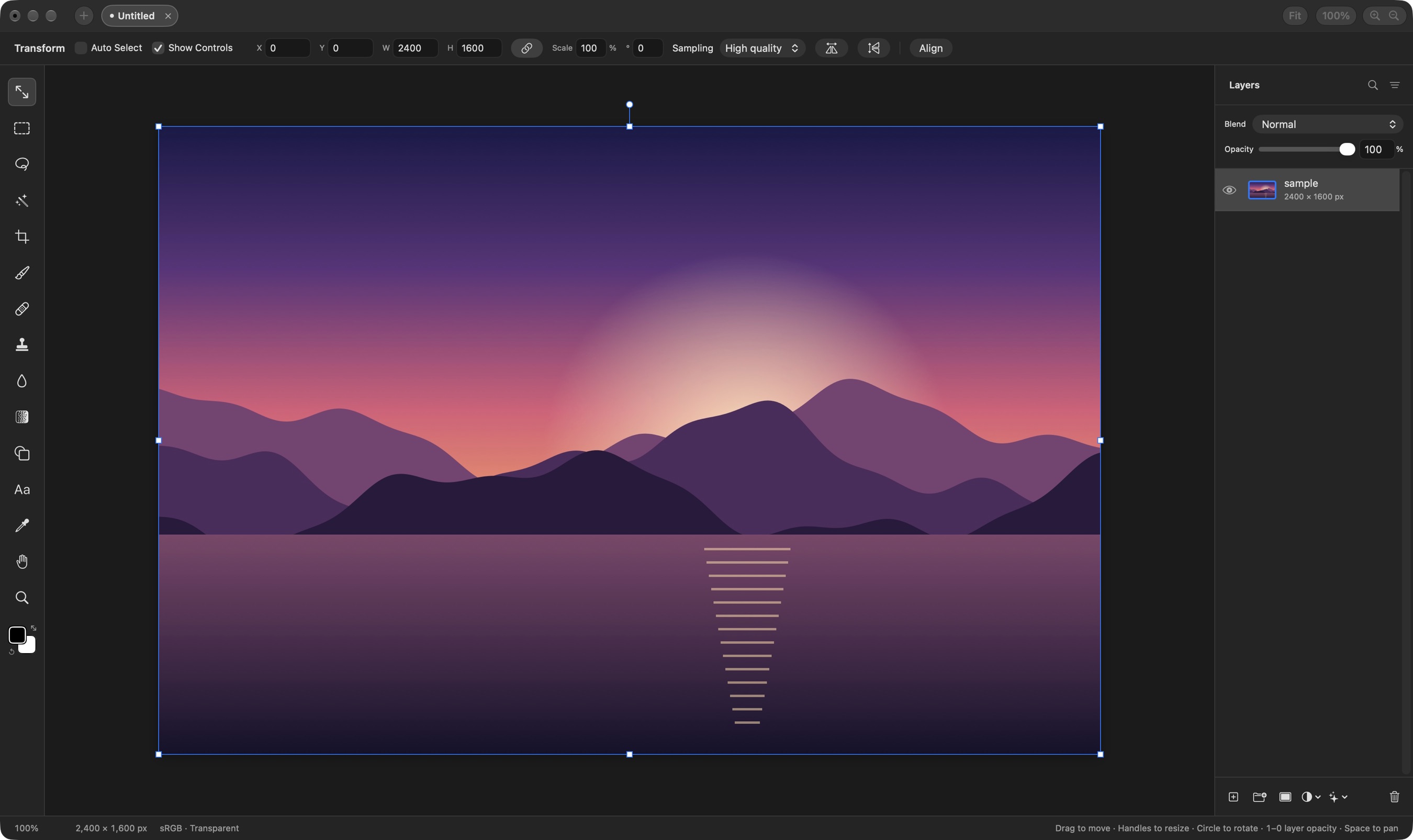
Tool layout, blend mode order and keyboard shortcuts follow Photoshop, so there's almost nothing to relearn. Shortcuts are remappable too.
English and Chinese
The whole interface is translated into Simplified and Traditional Chinese, using Photoshop's own terms. Switch any time from the menu.
Native on Apple silicon
Written for Apple silicon, with layer effects and filters rendered live on the GPU through Metal. Large images stay smooth.
Opens PSD and PSB
Folders, masks, blend modes and simple text stay editable, and you see a conversion report before anything is applied.
Offline and private
Everything happens on your Mac. No account, and your images never leave your computer.
Everything you need
The full toolset for compositing and post-processing.
Layers
- Layers and folders with opacity and Photoshop's full set of blend modes
- Layer masks: paint, fill, invert, blur and feather them; unlink to transform a mask on its own
- Clipping masks and folder masks
- Adjustment layers: Hue/Saturation, Levels, Curves, Exposure, Gradient Map, Grain, Black & White, Color Balance, Invert
- Filter layers: Gaussian Blur, Motion Blur, Progressive Blur, Sharpen, Noise, Vignette, Bloom, RGB Split, Lens Effects, Tonal Contrast
- Layer effects: Stroke, Drop Shadow, Color Overlay, Inner Shadow, Outer and Inner Glow, rendered on the GPU and editable any time
- Merge Down, Merge Layers and Merge Group; drag to reorder and nest; copy and paste layers between projects
Transform
- Non-destructive move, scale, rotate and flip, at full resolution however small you go
- Free distort (⌘-drag a handle)
- Transform several layers or a whole folder together
- Snapping to canvas and layer edges and centers, with guides
- Exact position, size, scale and angle
- Align and Distribute to layers, the selection or the canvas
Selections
- Rectangle and Ellipse Marquee, Freehand and Polygonal Lasso
- Magic Wand by color, and Object selection that traces what you click
- Select Subject; Expand, Contract and Feather
- Add, subtract, move the outline, or move and duplicate the pixels inside
- Load a layer's pixels or a mask as a selection
- Content-Aware Fill, which can also extend an image past its edges
Painting and retouching
- Brush and Eraser with size, hardness, opacity and smoothing; Shift for straight lines
- Pen pressure for size and opacity on a graphics tablet
- Spot Healing Brush (content-aware)
- Clone Stamp, aligned or not, sampling one layer or all
- Blur tool and Gradient tool
- Shape tool: rectangles, rounded rectangles, ellipses and lines that stay editable
- Type tool: multiline paragraphs, font, size, color, alignment and spacing; use text as a clipping mask
- Eyedropper and a full color picker
Adjustments and filters
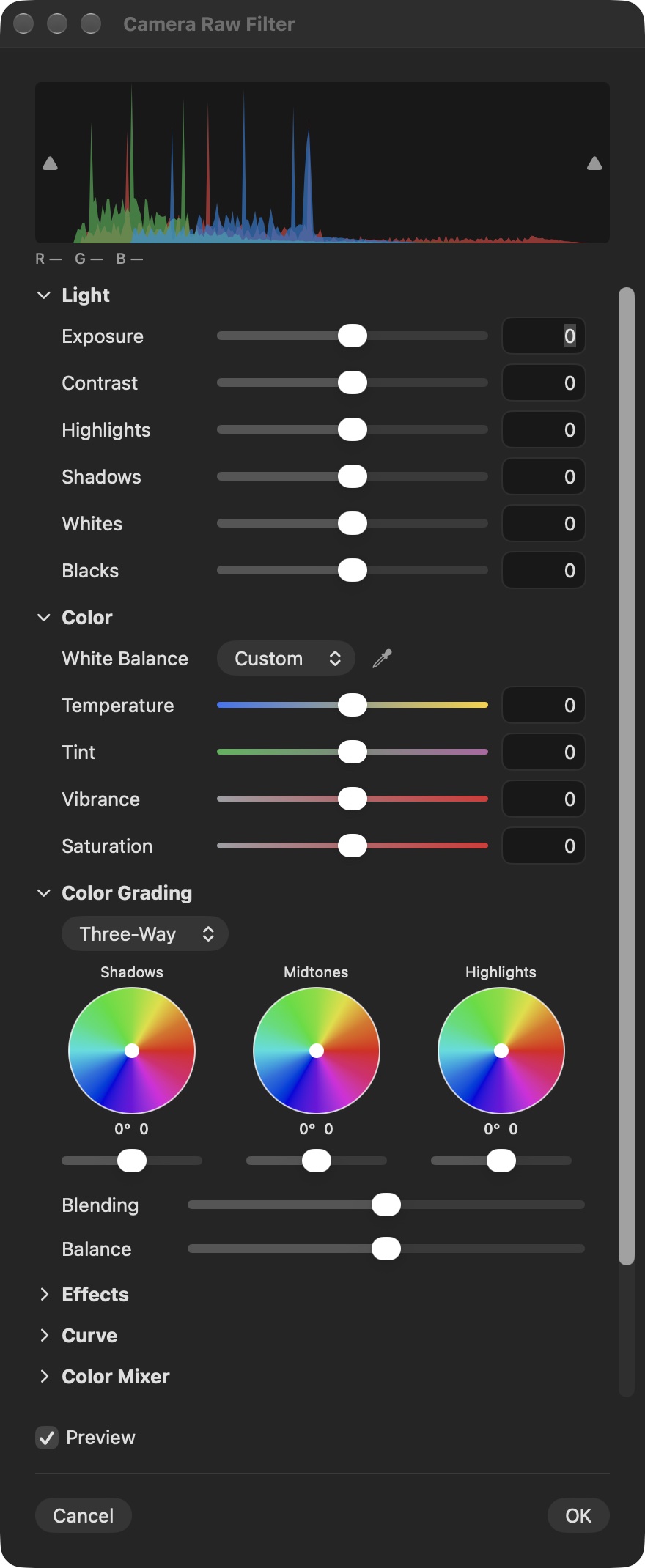
- Camera Raw filter: light, color, curves, color mixer, color grading, detail, optics and geometry
- Levels (with Auto), Curves, Hue/Saturation, Exposure, Gradient Map, Black & White, Color Balance
- Gaussian and Motion Blur that spread past a layer's edges
- Sharpen, Noise, Vignette, Bloom, Dither, Scanlines, RGB Split, Tonal Contrast
- Lens Effects: anamorphic flare, starburst, mist, prism, and round, hexagon, oval or cat's-eye bokeh
- Volumetric Light, Rim Light, Lens Correction and Remove Background
- Live previews, limited to the selection; ⌃⌘F runs the last filter again
Canvas and files
- Multiple projects in tabs; ⌘F searches every menu command and tool
- Fullscreen focus mode; rulers, guides, grid and snapping
- Crop with ratios like 3:4 and 9:16, Canvas Size, Image Size and Trim
- Import JPEG, PNG, HEIC, TIFF, WebP, SVG, PDF, animated GIF, camera RAW and PSD/PSB
- Export PNG, JPEG, PDF and animated GIF with a live preview and file size; Channel Pack for game textures
- 16-bit and HDR layers; keep working while a project saves
- Remappable Photoshop-style shortcuts; drag a number's label to scrub it
Highlights
Camera Raw panel
Light, color, curves, color mixer, color grading, detail, optics and geometry: tone a whole photo from one panel.
Volumetric and Rim Light
Place a light in the picture for fog and beams that thicken with distance, or put up to three colored rim lights behind the subject.
Content-Aware Fill
Select what you don't want and remove it in one step, or extend the picture past its original edges.
Select Subject and Remove Background
The subject is found for you as a selection or a mask, so cutouts don't need tracing by hand.
Lens Effects
Anamorphic flares, starbursts, mist, prism fringes and shaped bokeh for a cinematic look.
A project format AI can write
A .comp project is a folder of PNG layers and a manifest. Scripts and AI agents can build or edit one directly, and an open project updates live.
PhotoDuo and Photoshop
Photoshop does more and has a bigger ecosystem. If your work is mostly compositing and photo finishing, PhotoDuo covers most of the everyday jobs at no cost.
| PhotoDuo | Adobe Photoshop | |
|---|---|---|
| Price | Free | Monthly or yearly subscription |
| Account | Not needed | Adobe account required |
| Platforms | macOS (Apple silicon) | macOS, Windows, iPad |
| Chinese interface | Simplified and Traditional | Simplified and Traditional |
| PSD / PSB | Opens them (8-bit RGB) | Native format |
| Layers, masks, adjustment layers | Yes | Yes |
| Camera Raw | Built-in panel | Built in |
| Offline use | Fully offline | Periodic sign-in check |
Based on publicly available information, for reference only.
Download PhotoDuo
Free download, no sign-up.
Download PhotoDuo 1.0.0 (DMG, 6.2 MB)Requirements
macOS 26 or later on a Mac with Apple silicon (M1 or newer)
Signed with Joesan Inc's Developer ID and notarized by Apple, so it opens with a double-click.
Installing
- Open the DMG you downloaded
- Drag PhotoDuo into the Applications folder
- Open PhotoDuo from Applications or Launchpad
- PhotoDuo lets you know when a new version is out
SHA-256 checksum
PhotoDuo-1.0.0.dmg
c60ff88207a5829d2f03da771c5230649b973119cd3ad61bd4138c2f0d3b4d16FAQ
Is PhotoDuo really free?
Yes. Every feature is free, with no subscription, trial, ads or in-app purchases.
Can it open Photoshop PSD files?
It opens 8-bit RGB PSD and PSB files. Folders, masks, blend modes, rectangle and ellipse fills and simple horizontal text stay editable; other vectors and vertical text become pixels. CMYK isn't supported yet. You see a conversion report before each import.
Does it run on Intel Macs or Windows?
Not for now: PhotoDuo needs a Mac with Apple silicon running macOS 26 or later.
How do I change the language?
Choose PhotoDuo › Language in the menu bar and pick English, 简体中文, 繁體中文 or Follow System. It takes effect after a relaunch.
How do updates work?
PhotoDuo checks for new versions on its own, or choose PhotoDuo › Check for Updates. Updates are signature-checked before they install.
Are my images uploaded anywhere?
No. PhotoDuo works offline on your Mac, needs no account and collects none of your images.
Where are projects saved?
As .comp project files wherever you choose. Each is a folder of PNG layers plus a manifest, easy to back up or process with scripts.